Incidents do not arrive during office hours. They show up on a Friday evening with one administrator on shift, and the clock starts the moment somebody spots the incident in the logs. The Czech Cybersecurity Act allows 24 hours for the initial report, and financial institutions under DORA have their own classification and their own deadlines. That is when it becomes clear whether a company really keeps records of incidents or just sends e-mails and updates a spreadsheet.
The questions we hear most often about incidents
These three questions come from people who run security alongside another job.
- Who do we report an incident to, and when does the clock start?
- How do we prove six months later who did what and when?
- How do we know an incident counts as major under DORA?
Observa answers them like this. It derives the recipient and the deadlines from the regulatory profile of the organisation and counts them down on the incident itself. The course of the response goes into a log whose entries cannot be edited or deleted once saved. For organisations under DORA it keeps the classification criteria and proposes whether the incident is major. The decision stays with a person, Observa supplies the evidence and watches the clock.
What the regulation asks for
The Czech Cybersecurity Act
Handling cybersecurity events and incidents is one of the security measures under Act No. 264/2025 Coll. (Section 14), the Czech implementation of the NIS2 directive, with details set out in two implementing decrees for the higher and the lower regime. Reporting itself is covered by Sections 15 and 16.
A provider in the higher regime reports incidents to the national cybersecurity authority, a provider in the lower regime reports to the national CERT, and only incidents with a significant impact on the regulated service. Reports go through the portal of the authority, and where that is not possible, by e-mail or through a secure electronic mailbox. There are three deadlines: an initial report without undue delay and no later than 24 hours after detection, a notification within 72 hours of detection (24 hours for providers of trust services) and a final report within 30 days of the notification. If the incident is still running, a progress report is submitted instead. The authority or the national CERT responds to the incident no later than 24 hours after the initial report.
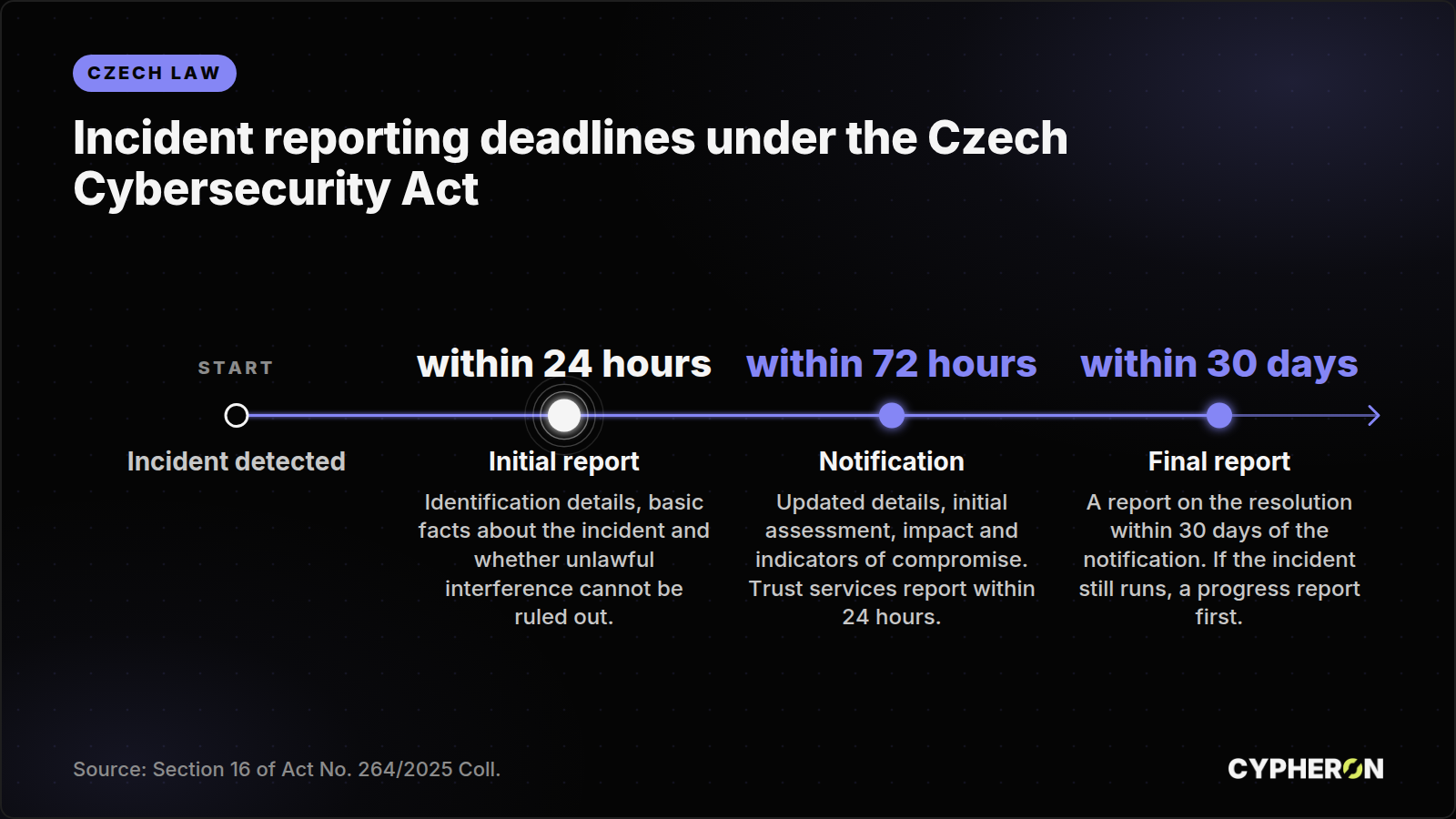
Deadlines under Section 16 of Act No. 264/2025 Coll. Observa counts them down based on the regulatory profile.
DORA
Under Regulation (EU) 2022/2554 (DORA), financial entities have to run an ICT-related incident management process (Article 17), classify incidents against set criteria (Article 18) and report major incidents to the competent authority, in the Czech Republic the national bank (Article 19). The classification criteria are set by Commission Delegated Regulation (EU) 2024/1772, the content and deadlines of the initial, intermediate and final reports by Regulation (EU) 2025/301, and the forms by Implementing Regulation (EU) 2025/302. The criteria build on clients and counterparties affected, volume of transactions, duration, geographical spread, data losses, reputational impact, costs and critical functions affected.
Data protection is a separate duty
Reporting a cybersecurity incident to the sector authority and notifying a personal data breach to the data protection authority under Article 33 of the GDPR are two different duties with two different recipients. One does not replace the other.
How Observa manages incident reporting
From detection to closure
An incident is recorded with the time of detection, severity, affected assets and services, an assignee and which property of the data was broken, that is availability, integrity, confidentiality or authenticity. The organisation names the levels of its own severity scale and each level carries its own response and resolution deadline. The incident moves through phases based on ISO 27035, from triage and investigation through containment, eradication and recovery to the post-incident review and closure, so it is immediately clear where the response stands. A playbook, meaning a prepared response scenario, creates tasks with assignees and due dates.
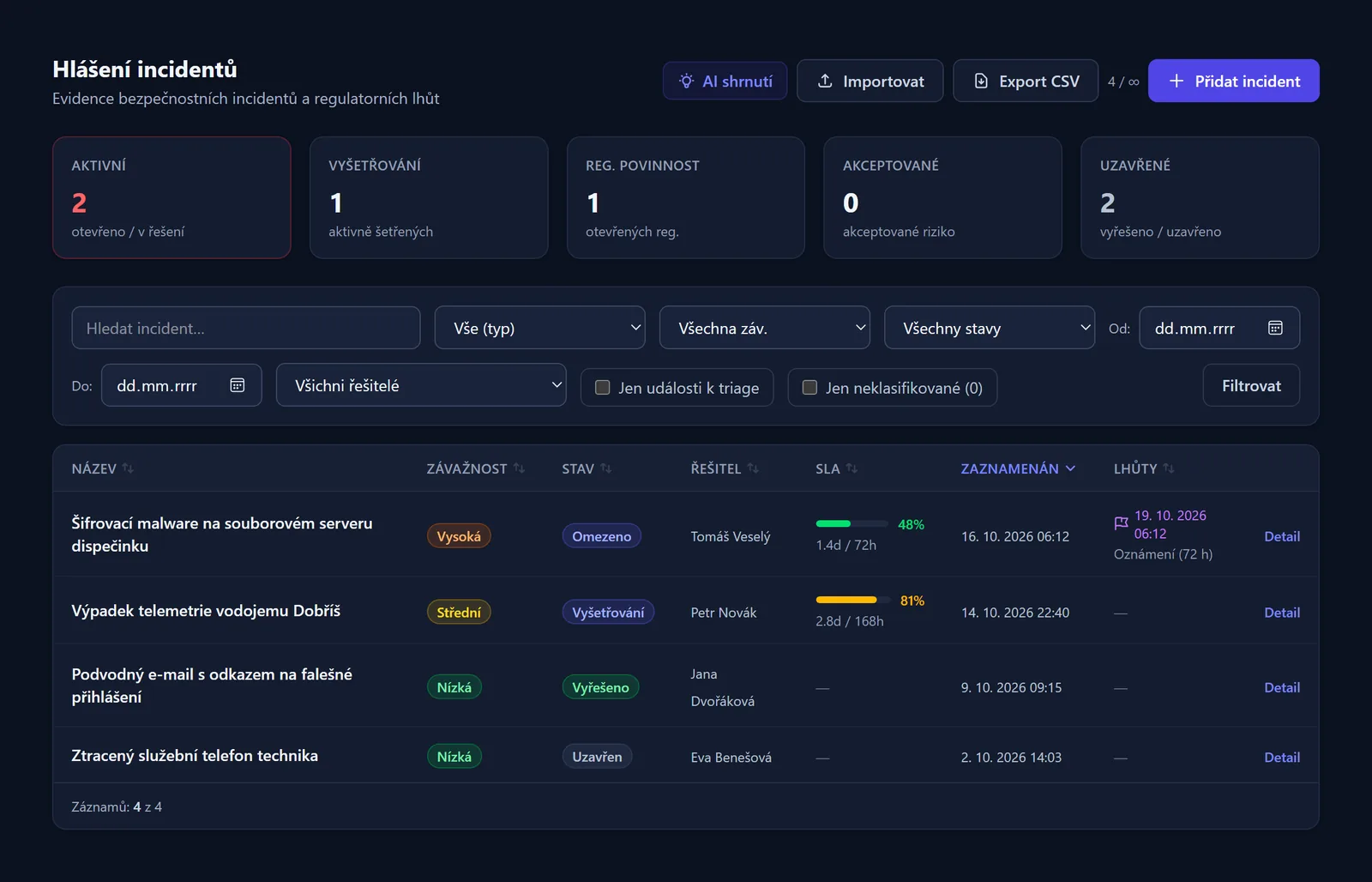
Incident list in Observa with severity, status, deadline compliance and the nearest reporting deadline.
A log that cannot be rewritten
The response is recorded in the incident log. An entry cannot be edited or deleted once saved, and Observa also keeps the change history of the incident record itself. This is the evidence an auditor or a supervisor asks for months later. The log, the incident report and the record of a submitted report can be downloaded as PDF.
Preparing the regulatory report
Observa prepares the content of the report in the structure and field order of the supervisor portal form, links to the correct form and records the moment of submission and the reference number. If the portal is unavailable, it produces the same content as text or PDF for e-mail or a secure electronic mailbox. Observa does not submit the report itself, that stays with an authorised person.
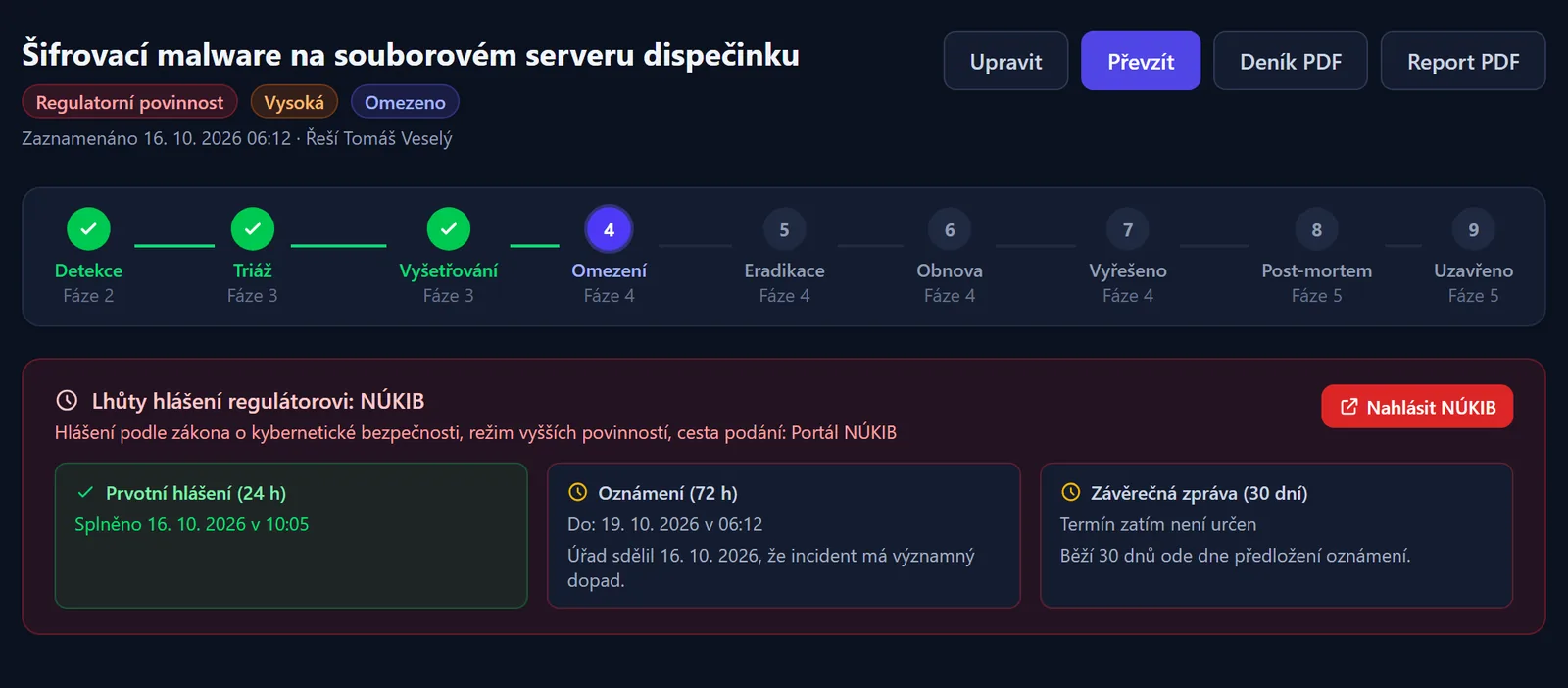
Incident detail with response phases and a countdown of reporting deadlines.
Classification under DORA
For organisations under DORA, Observa keeps the classification criteria, shows for each of them whether it is met, not met or missing data, and proposes whether the incident is major. Critical functions are prefilled from the assets the incident hit. If a person decides differently from the proposal, they have to give a reason and the reason goes into the log and the history.
What Observa does on its own
- It creates identified risks from gaps in the records: an incident with no linked risk, overdue deadlines, missing documentation or a vulnerability found on an asset. The risk appears in the register for review and a person has to accept or reject it.
- It reuses an answer given in one framework as a proposal for related requirements in other frameworks, so a measure put in place for national law is not assessed from scratch again for DORA. The user accepts or rejects the proposal (cross-framework mapping, Enterprise plan).
- Based on the regulatory profile it selects the regulation, the recipient and the reporting deadlines, and counts them down on the incident detail.
- For an incident above the configured severity threshold it raises the duty to report. The duty can be explicitly declined as long as no report has been submitted.
- It alerts the assignee, the escalation contact and the holders of security roles when a deadline is approaching or has been missed.
- It creates tasks from the playbook and a task for the report itself.
- Incidents are never deleted. They are closed and stay as evidence.
Connecting your other systems
The module does not have to stand alone. Integrations are available from the Professional plan.
- SIEM and monitoring: a security event from monitoring is written into Observa through the REST API without creating duplicate records, and an incoming webhook can add further findings straight into the log of a specific incident.
- Outgoing webhooks: creating an incident, a status change, a missed deadline or closure can notify your own tool, for example a company chat or an operations centre.
- Jira and ServiceNow: the incident is handed over to the ticketing system your IT team works in and the status is kept in sync between both systems.
- SIEM export: the Observa audit trail is exported to the customer SIEM, so it also lives in their long-term archive.
- Import and export: incidents from an existing spreadsheet can be loaded from Excel or CSV, and the list can be exported at any time according to the current filter.
Security, simplicity, clarity
Incidents are the most sensitive records in the whole application. Data is encrypted in transit and at rest, report attachments are stored encrypted with the key of your organisation, organisations are separated from each other, two-factor authentication is in every plan and single sign-on comes with the Enterprise plan. Every change leaves an audit trail and the service runs in data centres in the European Union.
Simplicity means nobody has to look up deadlines or recipients in the law. The regulatory profile sets them, the wording is plain and help is inside the application. Clarity means one place instead of a spreadsheet, e-mails and things people keep in their heads. An assignee sees their own incidents in one view, management sees status and deadline compliance, and a report for the board or the supervisor takes one click.
What the company gets out of it
During an incident nobody has to work out who writes to whom and when the clock actually started. The company has one place showing severity, the phase of the response, affected assets and the time left before the next report. Once the incident is closed, the evidence stays for an audit or an inspection, together with a review that can turn into a change of controls instead of another incident of the same kind.
Common questions
Which plan includes the module?
Incident reporting is part of the Professional plan (6,490 CZK per month, 64,900 CZK with annual billing) and the Enterprise plan (11,990 CZK per month, 119,900 CZK with annual billing). The Starter plan does not include the Incidents module. The assessment frameworks for the Czech Cybersecurity Act, DORA and the GDPR are in every plan and are not a paid add-on. Prices are shown excluding VAT, the current overview is in the Observa price list.
Can we bring in incidents we already keep in a spreadsheet?
Yes. Incidents are imported from Excel or CSV using a template. A file check first shows what will be created and what will be skipped, so the import does not overwrite anything.
Does Observa submit the report for us?
No. Observa prepares the content of the report in the structure of the supervisor portal form and records when it was submitted and under which reference number. The submission is done by an authorised person on the portal, because the authority offers no interface for automated filing.
Who works with the module and who can see incidents?
A contributor creates the incident, moves it through the phases and closes it, submits reports and confirms the DORA classification. The severity scale, deadlines, reporting threshold and playbooks are configured by the module administrator. A user with a limited read scope only sees incidents they reported or are handling, or incidents on assets of their own service.
How do we start?
Set the regulatory profile, carry over the severity scale and thresholds from your incident handling methodology, import the existing records and prepare one playbook for the scenario that worries you most. The rest can wait until the first incident.
Try Observa for free
You can register for a 7 day free trial without a card and walk through incident records on sample data. The other option is to book a demo where we go through your regime and deadlines. Interested, or have questions? Get in touch.
Related reading: asset inventory and impact analysis, because affected assets on an incident come from there, and supplier management if the incident started at a supplier. The whole application is introduced in the overview article about Observa. We also help with regulatory readiness as people, not only as software, see security assessment.
Next Monday we look at risk management: how the risk register is built in Observa, how risks are assessed and how they turn into measures with an owner and a due date.
Sources: Act No. 264/2025 Coll. on cybersecurity, Sections 14 to 17 on measures and incident reporting · Regulation (EU) 2022/2554 (DORA), Articles 17 to 19 on incident management, classification and reporting