In a regulated company, the risk register is often a spreadsheet someone started two years ago. It was assessed once, five people added to it and each of them did it differently. Then the auditor arrives and asks for a risk assessment report, a treatment plan with deadlines and owners, and evidence that senior management has read both.
Risk management is the core of the whole information security management system. The results of the assessment decide which controls the company implements, how much money goes into them and which ones are left out with a justification. This article describes what Czech rules require and how the risk register is kept in Observa, our platform for managing security and compliance.
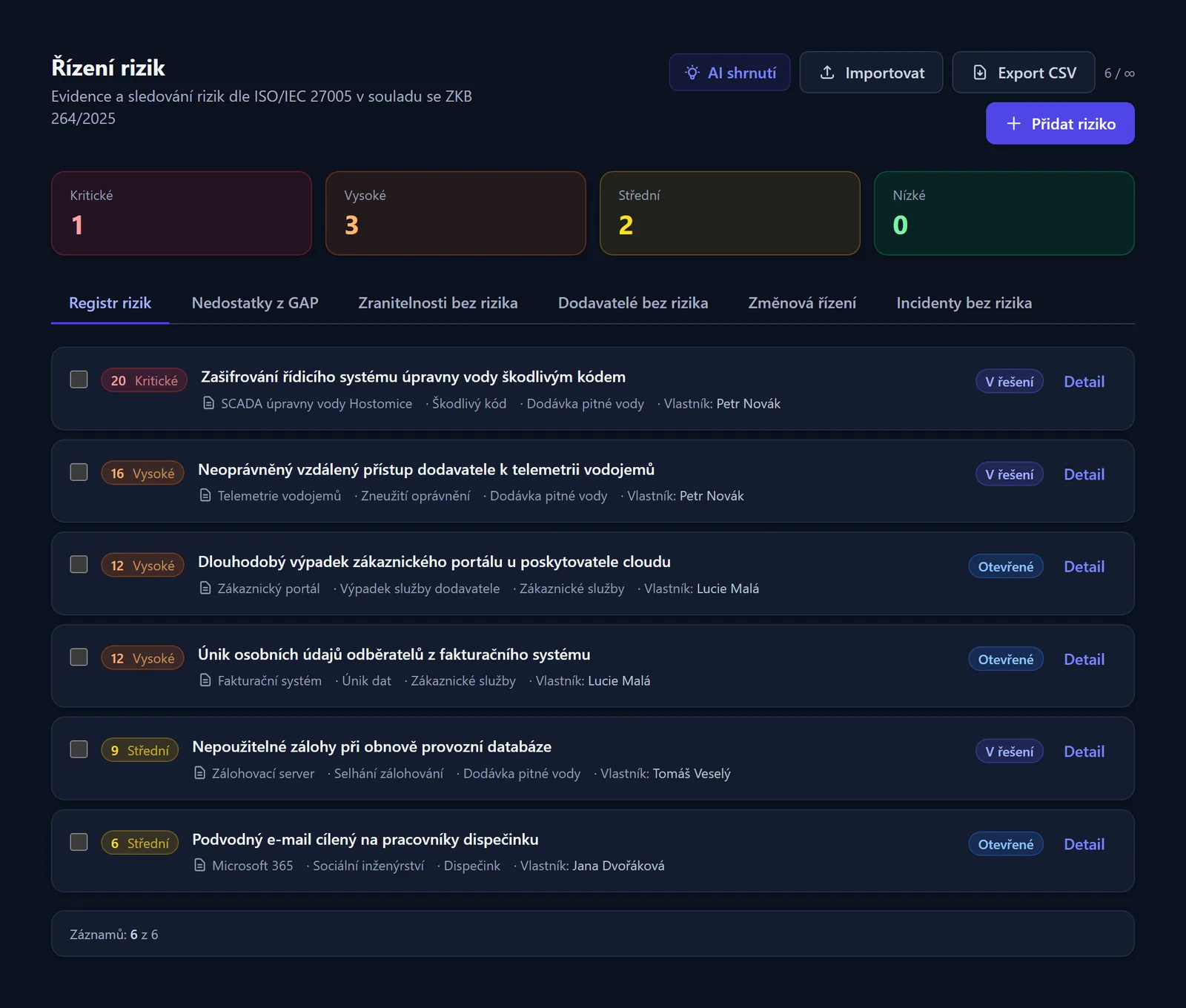
Risk register of a sample organisation: risks sorted by score, with status and owner.
Questions we hear about risk
- How often do we have to assess risks and what has to be in writing?
- Do we have to use the regulator methodology, or can we keep our own ISO formula?
- Who is allowed to accept a risk and how do we evidence it to an auditor?
- How do risks from a gap analysis and from vulnerability scanning get into the register?
Here is how Observa answers that.
What the rules require
In the Czech Republic, the Cybersecurity Act and its decrees implement the NIS2 directive. For providers of a regulated service in the higher obligations regime, risk management is set out in section 8 of Decree No 409/2025 Coll. The organisation defines a methodology for identifying and assessing risks including risk acceptance criteria, considers at least the categories of threats and vulnerabilities listed in Annex 3 of the decree, and follows at least the scope of Annex 4 when assessing risk.
Risk assessment is carried out at regular intervals, at least once a year, and whenever a significant change happens. Incidents already handled, results of cybersecurity audits, penetration testing and vulnerability scanning have to be taken into account. The assessment produces a risk assessment report, a statement of applicability and a risk treatment plan with prescribed content.
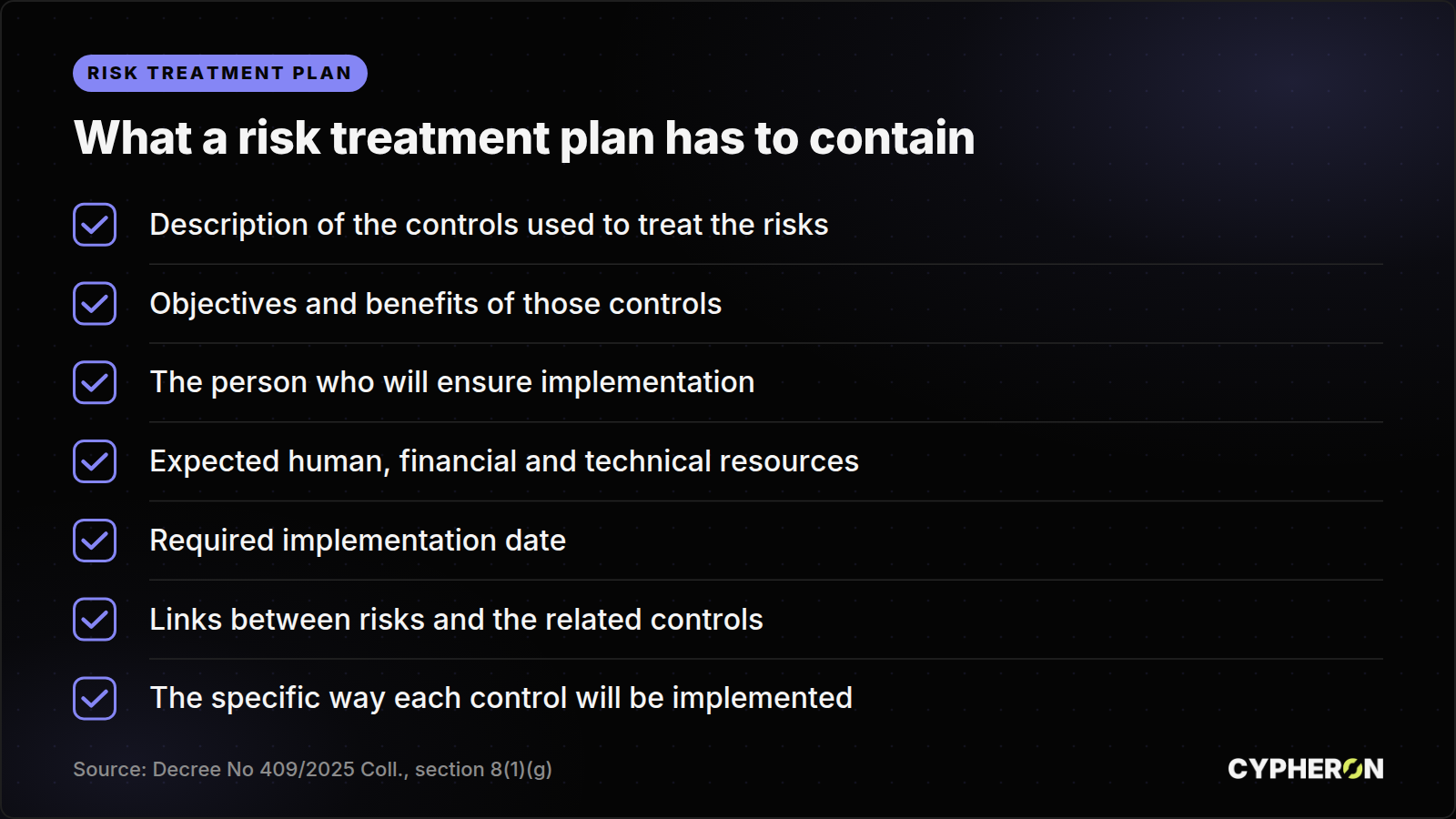
Senior management has to demonstrably review both the risk assessment report and the treatment plan (section 4(2) of the decree), and delivery of the plan is evaluated in the annual review of the management system (section 3).
In the lower obligations regime, Decree No 410/2025 Coll. does not require a formal risk register. Instead the organisation keeps an overview of security controls under Annex 1 and updates it at least once a year, including an evaluation of how effective the implemented controls are (section 3(2)). Even there, setting priorities without any record of risk is hard.
Financial institutions under the DORA regulation manage ICT risk as a continuous process that is documented and reviewed regularly. Check the exact provisions in the text of the regulation, we are a security team and not a law firm. Observa includes the DORA assessment framework in every plan.
How Observa keeps the risk register
In Observa, a risk is a possible event that could damage an asset and through it the service the organisation provides. The register therefore builds on the asset inventory and impact analysis: a risk is linked to the primary asset that is threatened and to the supporting or technical asset that is its source. The form proposes the impact from the asset assessment, so the same thing is not rated twice. You can pick several assets at once and a separate risk is created for each.
There are two formulas. Likelihood times impact following ISO/IEC 27005, or threat times vulnerability times impact following the regulator methodology. Scales of the axes and the names and thresholds of the resulting risk levels follow your own methodology, with defaults that match the decree. The catalogue of threats and vulnerabilities is based on Annex 3 of Decree No 409/2025 Coll. and you can add your own entries.
For treatment you choose between reduction, transfer, sharing, avoidance, elimination and acceptance, with a mandatory justification for acceptance. The proposal goes for approval and a four eyes rule can be switched on, so the person who proposed the treatment cannot approve it. Each control has an objective, a type, a target date and an owner, it turns into a task, and the summary is issued as a Risk treatment plan in PDF.
Risk appetite is the score an organisation accepts without further controls. Risks below it can be accepted automatically, and Observa warns when a risk limit is exceeded. A risk is never deleted, it is closed with a reason, every assessment stays in the history with its date as evidence of how the risk developed, and review cycles can be run in bulk. A completed cycle remains as audit evidence.
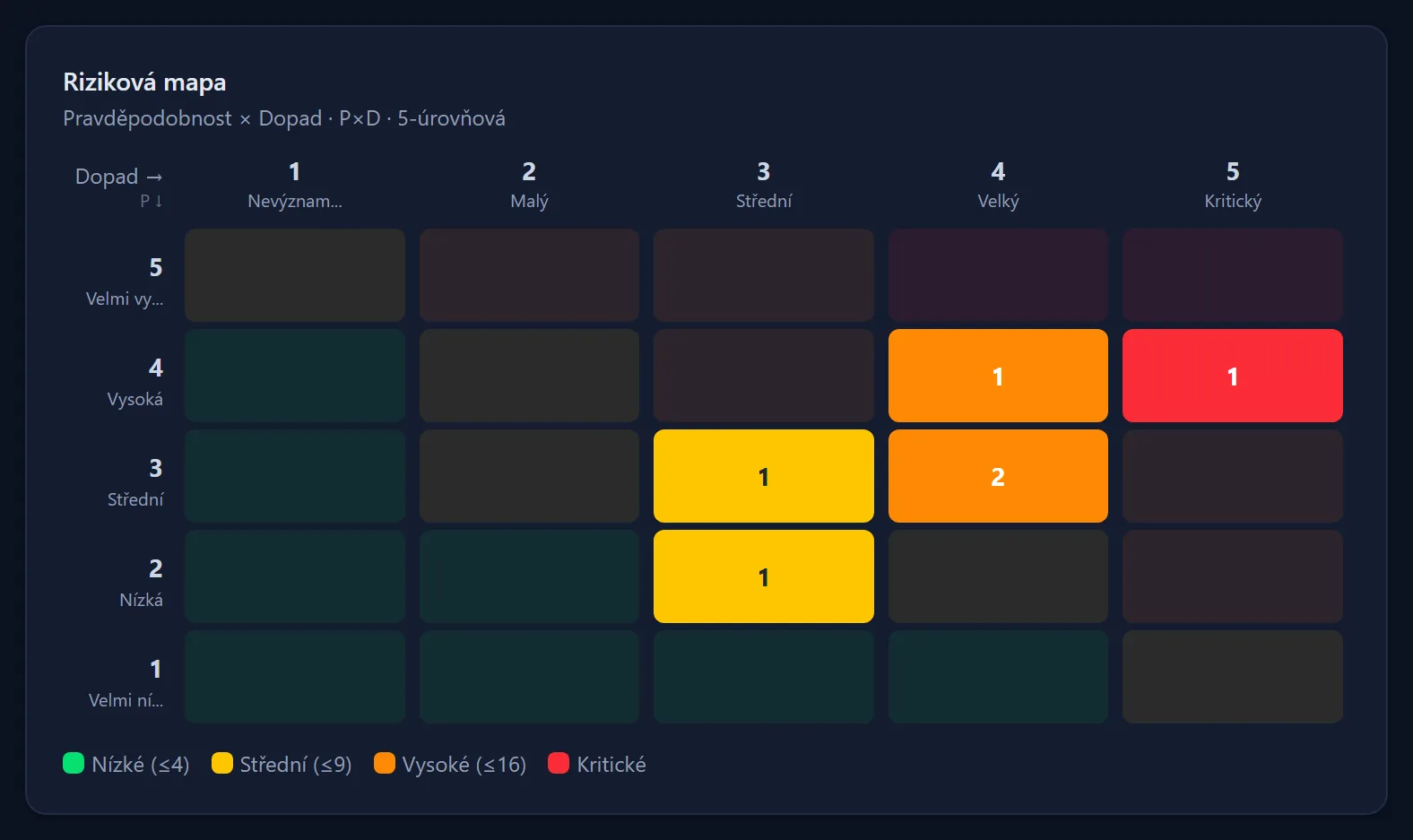
Risk map: risks placed by likelihood and impact, with those above the appetite immediately visible.
What Observa does on its own
- It creates risks from shortcomings that appear elsewhere in the application: from vulnerabilities found, from expired licences on assets, from incomplete records of a supplier and from assessment scales that do not match the decree.
- It offers to create a risk in one click from gap analysis findings, from vulnerabilities without a risk and from suppliers, changes and incidents without a risk.
- It proposes the impact of a risk from the values of the asset, following the impact assessment methodology.
- It tracks the annual review date of every risk and warns before it falls due.
- It turns a control into a task with a date and an owner and warns about approaching and overdue deadlines.
- It connects assessment frameworks: an answer in one framework proposes an answer for related requirements in other frameworks and the user accepts it or rejects it. Mapping between frameworks is available in the Enterprise plan.
- It issues risk reports, the treatment plan and review cycle records as PDF, so audit evidence is not assembled by hand.
A person always decides. Observa does not decide how you treat a risk. It prepares the ground, watches the deadline and records who proposed and who approved what.
Connecting other systems
- REST API (from the Professional plan): risks can be read and created from other tools. In practice a finding from a vulnerability scanner or a ticket from an ITSM tool creates a risk without anyone retyping it into a spreadsheet.
- Import from an Excel workbook or CSV (from the Starter plan): you upload your existing risk spreadsheet using a template and a file check first shows what will be created, changed and skipped.
- CSV export and PDF (from the Starter plan): the register as currently filtered for management, the risk treatment plan and risk reports for the auditor.
Security, simplicity and clarity
Security. Data is encrypted in transit and at rest, attachments with a key held per organisation, and organisations are separated from each other. Two factor authentication is in every plan, single sign on in the Enterprise plan. Every change to a risk leaves an audit trail and the service runs in data centres in the European Union.
Simplicity. The regulatory profile of the organisation decides what applies to it, and Observa then picks the assessment framework, the terminology and the citations used in reports. Scales and the threat catalogue come prefilled and help is available inside the application.
Clarity. A filterable register and a risk map instead of spreadsheets in email, tasks with deadlines and reminders, and management reports in one click.
What the organisation gets
Risks, controls and evidence sit in one place and nobody collects them from mailboxes the week before an audit. The risk assessment report and the treatment plan can be issued at any time. Management can see which risks sit above the appetite and who owns which control and when it is due. Because every assessment is kept with its date, the way a risk developed over time is evidenced as well.
Common questions
Which plan includes risk management
The module is in every plan, as are the assessment frameworks for the Czech act, DORA and GDPR. Import, export and PDF reports come from the Starter plan, the REST API from the Professional plan and mapping between frameworks in the Enterprise plan. Plans start at 2 990 CZK per month, prices are stated without VAT, and details are in the Observa price list.
Can we keep our own methodology
Yes. The formula, the number and labels of the levels on the axes, the names and thresholds of the resulting risk levels, the acceptance criteria and the risk appetite are all configurable. The module settings also generate a risk management methodology document.
How do we get our existing risks in
By import from an Excel workbook or CSV using a template. The file check shows what will happen before anything is created.
Who works with the register
Permissions are set per module. A contributor creates, assesses and proposes treatment, a manager approves proposals and closes risks, a module administrator configures the formula and the scales. A user responsible for one service sees the risks of that service and its assets.
How to start
Create a trial organisation, set the regulatory profile and move in the risks you already have. The onboarding guide walks you through the scales and the first assessment then takes minutes rather than an afternoon.
Try Observa for free
You can register at observa.cypheron.cz and the first 7 days are free with no card required. Would you rather see a demo on your own data and scenarios? Arrange one through our contact form. Interested, or have questions? Get in touch.
Next Monday the campaign continues with policies and methodologies: how Observa keeps security policies, their approval, versions and acknowledgement, and how methodology documents are generated from the settings of the application.
Sources: Decree No 409/2025 Coll., sections 3, 4 and 8 and Annexes 3 and 4, risk management in the higher obligations regime · Decree No 410/2025 Coll., section 3, overview of security controls in the lower obligations regime · Act No 264/2025 Coll. on cybersecurity · Regulation (EU) 2022/2554 (DORA), full text